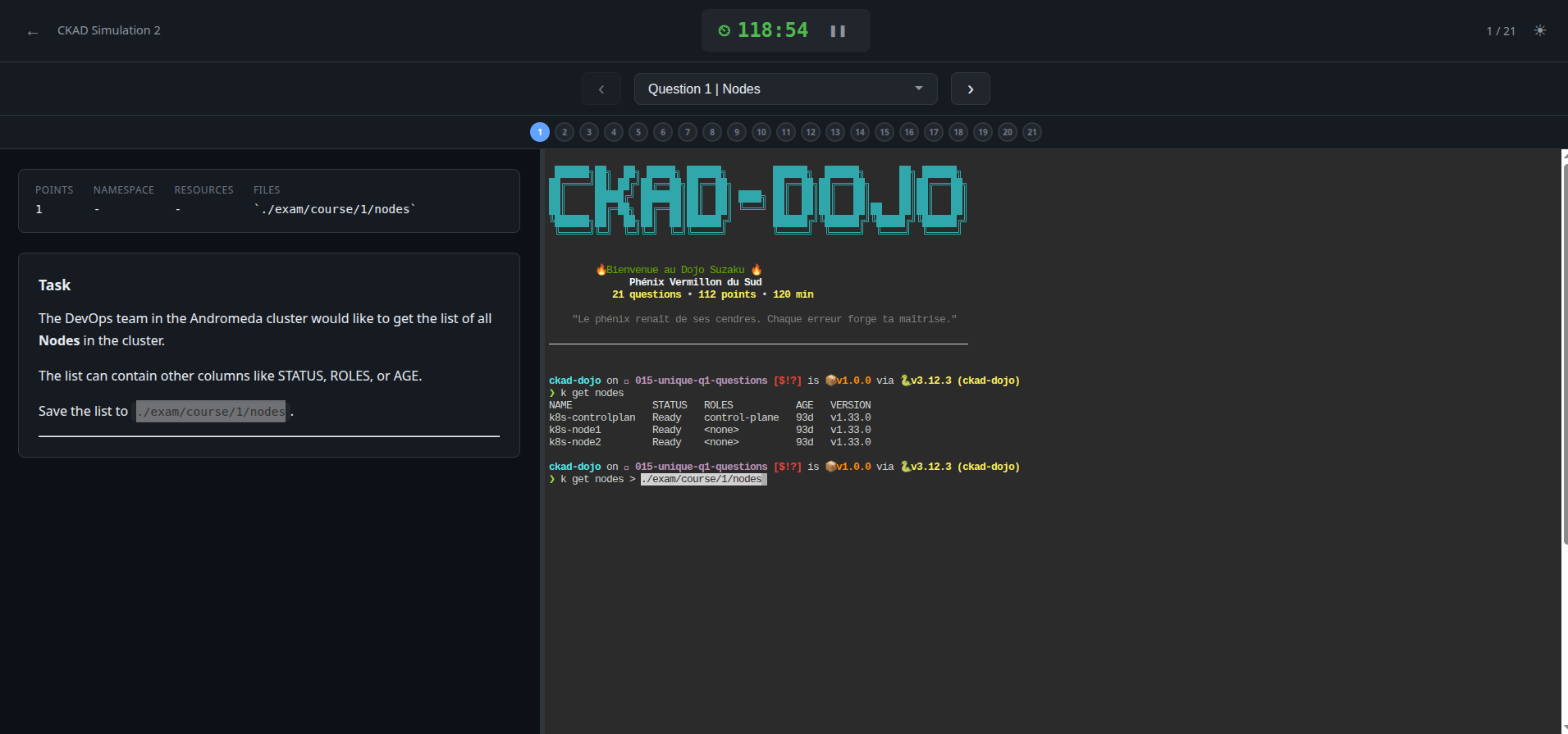
ckad-dojo: a local CKAD exam simulator
Why create a CKAD training platform?
When I started preparing for the CKAD certification, I quickly noticed a gap: there wasn’t really a local simulator that replicated real exam conditions. Online platforms are often paid, time-limited, and most importantly you can’t just relaunch them at will to work on your weak spots.
What I wanted was a tool I could run on my local cluster, with a real 2-hour timer, questions that set up their own Kubernetes environment, and automatic scoring to know exactly where I stand. So I built it.
What does CKAD Dojo offer?
ckad-dojo is a CKAD exam simulator that runs entirely locally. You launch a command, it deploys the required Kubernetes environment (namespaces, resources, Helm releases), opens a web interface with a 120-minute timer and an embedded terminal, and at the end you can score your answers against 400+ automatically evaluated criteria.
The core idea is simple: replicate the real exam experience as closely as possible — questions on the left, terminal on the right, countdown ticking.
The 9 dojos
The content is organized into 9 “dojos”, each inspired by creatures from Japanese mythology. Every dojo is a complete, standalone exam with its own naming theme for Kubernetes resources.
The first three are the Celestial Guardians (Shishin):
- Suzaku (Vermillion Phoenix) — 21 questions, constellation theme
- Byakko (White Tiger) — 20 questions, Greek mythology theme
- Genbu (Black Tortoise) — 20 questions, Norse mythology theme
The next six are creatures from Japanese folklore:
- Kappa — 17 questions, river and water theme
- Kirin — 20 questions, ocean theme
- Tengu — 20 questions, mountain theme
- Tanuki — 20 questions, forest theme
- Inari — 20 questions, harvest theme
- Ryujin — 20 questions, sea and depths theme
In total: 178 questions covering the entire CKAD curriculum — pods, deployments, jobs, Helm, probes, services, storage, ConfigMaps, NetworkPolicies, sidecars, init containers, and more.
Integrating community contributions
An important aspect of this project: not all dojos were written from scratch. Some build on the work of other members of the Kubernetes community, and that’s intentional and credited.
Dojo Kappa (simulation 4) is adapted from @aravind4799’s CKAD-Practice-Questions repository. His questions had a pragmatic approach that I found complementary to my own exercises.
Dojos Tengu, Tanuki, Inari, and Ryujin (simulations 6 through 9) are adapted from @dgkanatsios’s CKAD-exercises, a well-known classic in the CKAD community. His work covered large sections of the curriculum that I wanted to integrate rather than reinvent.
In both cases, the integration went well beyond copy-paste. Each question was adapted to the ckad-dojo format: reformatted in Markdown, equipped with automated scoring scripts with precise validation criteria, provided with setup manifests to create the necessary environment, and renamed according to the dojo’s theme. It’s real adaptation work, but the raw material comes from these contributors and it’s important to acknowledge that.
How it works
Starting an exam
# Via the Python CLI (recommended)
uv run ckad-dojo

# Or directly with Bash
./scripts/ckad-exam.sh
This opens the web interface at http://localhost:9090. The layout is split into two panels: questions on the left, an embedded terminal (via ttyd) on the right. The timer starts, and off you go.
Scoring
At any point, you can evaluate your answers:
uv run ckad-dojo score -e ckad-simulation1The scoring checks every criterion: does the pod exist, in the right namespace, with the correct labels, the right image, the proper probes? Each question has between 1 and 10 criteria, and you get a detailed score with the percentage and a pass/fail verdict (66% threshold, just like the real exam).
The web interface
The timer changes color based on remaining time:
- Normal above 15 minutes
- Yellow at 15 minutes
- Orange at 5 minutes
- Red at 1 minute
You can navigate between questions, flag them for review (F key), and move through them with arrow keys.
What technologies are used in CKAD Dojo?
The project uses a unified Python CLI (ckad_dojo.py) built with argparse and managed by uv. It orchestrates the Bash scripts that do the actual work (setup, scoring, cleanup). The web interface is vanilla JS with a standard library Python server — no framework, no external dependency.
On the code quality side: pre-commit with shellcheck, shfmt, flake8, yamllint, markdownlint, and gitleaks for secret detection. The project also includes unit tests for shared Bash functions.
The role of vibecoding in this project
ckad-dojo was built entirely through vibecoding with Claude Code. The technical infrastructure — Python CLI, web interface, setup and cleanup scripts, automated scoring system — was generated through natural language conversation. But vibecoding wasn’t limited to the tooling: the exam questions themselves were also produced with Claude Code, using an internal workflow I developed to generate complete simulations (problem statements, Kubernetes environments, scoring criteria). My role was to frame each simulation, validate the technical accuracy of every question on my cluster, and ensure the content properly covers the CKAD curriculum. Kubernetes expertise remains essential — you need to know what to ask for and be able to judge the quality of the output — but Claude Code turned what would have been months of work into a few weeks.
License and philosophy
The project is licensed under CC BY-NC-SA 4.0 — free for personal and educational use, with attribution and share-alike requirements. Choosing this license over MIT reflects the educational nature of the content: the questions and solutions have real pedagogical value, and the idea is to keep them accessible to everyone without being repurposed for commercial use.
The repository is at TiPunchLabs/ckad-dojo — feedback, bug reports, and contributions are welcome.