Kandidat — I needed an application tracker, so I designed and deployed it the DevOps way
The starting point: job hunting in Guadeloupe
When you’re looking for a DevOps position in Guadeloupe, the market is tight. Local openings can be counted on one hand, so you end up juggling between the few on-site positions, remote opportunities, and unsolicited applications. Every lead matters, and that’s precisely why you need to stay organized: don’t miss anything, follow up at the right time, tailor your CV to each context. My notes weren’t cutting it anymore.
I needed a tool that centralizes everything: applications, target companies, contacts, attached files, and most importantly one that helps me adapt my CV to each role. Rather than searching for yet another SaaS, I decided to design it myself, build it with Claude Code as support, and automate its deployment on my homelab by putting into practice the DevOps culture I apply every day.
That’s how Kandidat was born.
What Kandidat does
Kandidat is a local web application for tracking job applications. No SaaS, no account to create, no third-party dependency. Data stays on my machine — SQLite in development, PostgreSQL in production.
Application management
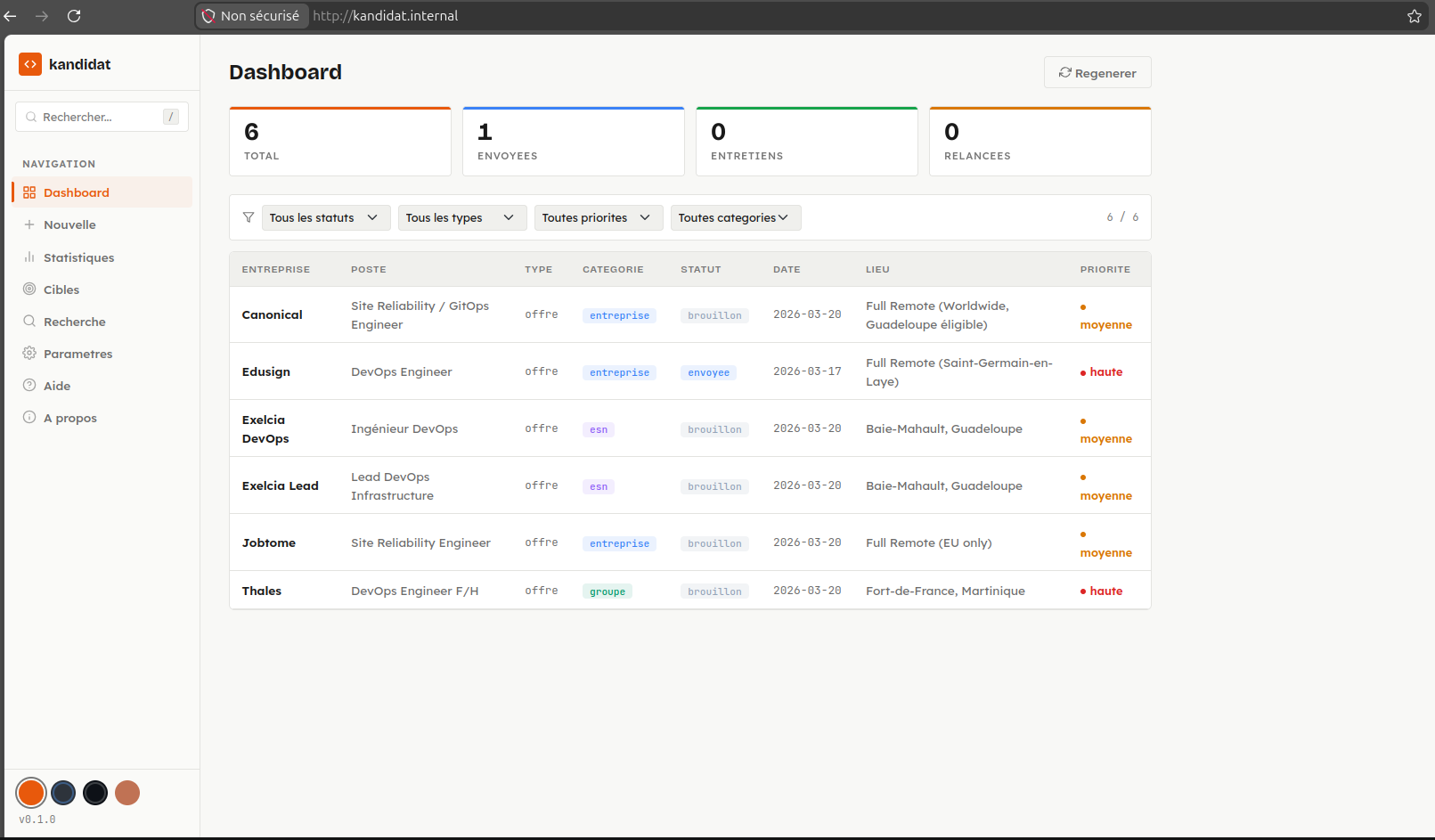
- Dashboard with a filterable, sortable table (status, type, priority, category)
- Detailed view per application: metadata, status history timeline, Markdown content, attached files
- State machine for status transitions: draft → sent → followed-up → interview → accepted/rejected → archived
- File attachments: CVs, cover letters, job offers, notes
Target companies and contacts
- Company pool organized by category (large groups, IT consulting firms, recruitment agencies, associations)
- Associated contact cards (name, role, email, phone, LinkedIn)
- Drag-and-drop reordering
- Automated enrichment via web search (Tavily) + LLM extraction
AI-powered CV adaptation
This is the feature that motivated me the most. From a reference CV in HTML, Kandidat generates a version tailored to the target position and company. The system uses an interchangeable LLM provider — Claude (via the Anthropic API) or Ollama (locally) — to rephrase and reorganize content based on context.
The adapted CV can then be exported as PDF (via WeasyPrint) or DOCX (via python-docx), preserving an ATS-friendly structure.
Search and analytics
- Hybrid full-text search (database + Markdown files on disk)
- Analytics dashboard: breakdown by status, type, priority, company category
Technical architecture
The project follows a classic layered architecture, deliberately simple and readable:
Frontend (Jinja2 + Vanilla CSS/JS)
        │
  APIFlask (HTML routes + REST API)
        │
  Services (business logic, Pydantic)
        │
  SQLAlchemy (SQLite dev / PostgreSQL prod)
Backend stack
- APIFlask (Flask enhanced with auto-generated OpenAPI/Swagger)
- SQLAlchemy for ORM, Pydantic for validation
- WeasyPrint + python-docx for document generation
- httpx for HTTP calls (Ollama, Tavily)
- LLM provider abstracted via a Python Protocol — adding a new provider means implementing two methods
Frontend stack
No JS framework. Jinja2 server-side templates, native CSS with a 4-theme design system (Precision, Dim, Dark, Pastel), and vanilla JavaScript. The interface is responsive and functional, without bloat.
MCP server
Kandidat also exposes an MCP server (Model Context Protocol) in TypeScript, with 22 tools accessible from Claude Desktop or Claude Code. You can manage your applications in natural language: create an application, search, adapt a CV, enrich a company — all through an LLM agent connected to the REST API.
DevOps culture applied to the project
Building the application wasn’t enough. I wanted to treat it like a real product: code quality, tests, security, automated deployment. Not for show, but because that’s how I work.
Code quality
- Ruff for linting and formatting
- Bandit for security analysis
- pytest with 81% coverage
- Pre-commit hooks to enforce quality on every commit
Documentation and technical decision tracking
A product without documentation is a product nobody else can pick up. I pay particular attention to documenting not just the how, but especially the why behind technical choices. The repository contains structured documentation:
doc/architecture.md— architecture overview, application layers, database schemadoc/deployment.md— production infrastructure, deployment strategy, network configurationdoc/configuration.md— environment variables, LLM settings, customization optionsdoc/development.md— developer guide, conventions, contribution workflowdoc/mcp-architecture-proposal.md— detailed MCP server architecture proposal, design decision rationale
Each document explains the decisions made and their motivations. Why APIFlask over FastAPI? Why a Python Protocol for LLM abstraction? Why PostgreSQL in production and SQLite in dev? These answers live in the documentation, not in the developer’s head. It’s a habit I consider essential in a DevOps approach: code tells the what, documentation tells the why.
CI/CD pipeline (GitLab CI)
The pipeline has 5 stages:
| Stage | Purpose |
|---|---|
| lint | Style and formatting checks (Ruff) |
| test | Unit and integration tests (pytest, SQLite in-memory) |
| security | Security analysis (Bandit) |
| build | Multi-stage Docker build, push to registry |
| deploy | Deployment via Ansible to the homelab (manual gate) |
Homelab deployment
The deployment targets a dockhost VM on my Proxmox homelab. The process is fully automated:
- The GitLab runner (hosted on the bastion) executes the Ansible playbook
- Ansible pulls the Docker image from the registry
- The container is deployed alongside PostgreSQL 17 on a shared Docker network
- Data persists via a mounted volume
Developer → GitLab CI → Bastion (runner) → Ansible → Dockhost (container)No cloud deployment. Everything runs on my local infrastructure, managed like a real production environment. If you want to learn more about this setup, I wrote a detailed article about my homelab.
Infrastructure as Code
The GitLab and GitHub repositories are themselves managed by Terraform — project configuration, branch protection, CI variables, everything is versioned.
The role of vibecoding in this project
Kandidat was largely developed through vibecoding with Claude Code. The entire Flask backend — routes, services, SQLAlchemy models, Pydantic schemas, state machine — was built conversationally: I described the expected feature, Claude produced the code, I tested and iterated.
Vibecoding was particularly effective on the more mechanical parts: CRUD operations for applications and companies, Pydantic validation, HTML parsing for DOCX conversion, and LLM provider integration. The TypeScript MCP server was also largely generated by Claude Code, leveraging the protocol documentation.
My role was to design the product, define the architecture, validate every technical choice, and bring the DevOps expertise for the CI/CD pipeline and Ansible deployment. AI is a support tool, not a pilot. What would have taken weeks of solo development was completed in a few days, with a level of test coverage and documentation I probably wouldn’t have achieved in the same timeframe.
What this project brings me
Kandidat helps me daily in my job search. But building it also allowed me to put into practice, end to end, what I do every day as a DevOps engineer: start from a need, design a product, build it with the right tools — including AI —, test it, document it, and ship it to production on infrastructure I manage myself.
The repository is available on GitHub: Kandidat